A greater problem than the possibility of camera shake will be the task of getting the correct exposure. This is sometimes quite tricky with all that glare from white sand and sea. This will almost certainly confuse your auto exposure settings and will give a false reading on the manual exposure scale. So be prepared to use your Exposure Compensation setting to over-expose by around one stop if necessary. If you are using Manual exposure mode, simply set the exposure on the + plus on the scale by a similar amount. But check on your LCD and with your histogram function to make sure you have the exposure just right. You may have to go into your menu settings to brighten the LCD screen a little so that it will be more easily seen in the bright daylight.
Chances are you will also be shooting in very hard, contrasty sunlight, but the reflections from the sand might help fill the worst of the dark, empty shadows. The old rule about shooting early in the morning and late in the afternoon for the best light is generally a good one, but sunbathers are often out there baking themselves around midday when the sun is blazing down from an empty blue sky – you’ll just have to make the most of it.
Beware the sand and sea – a terribly destructive combination for camera gear. Keep lens changes to a minimum and never change lenses in sea spray or when the wind is whipping up the sand. This is just asking for trouble. Keep cameras out of direct sunlight whenever possible – body and lenses can heat up dramatically and this can do irreparable damage.
Top photograph
This was a posed photograph taken in Normandy. The composition was kept deliberately simple by choosing an angle facing straight on to the beach hut. The girl was asked to sit down right in the middle of the doorway and look to one side. I liked the shapes and combination of colours
This was a posed photograph taken in Normandy. The composition was kept deliberately simple by choosing an angle facing straight on to the beach hut. The girl was asked to sit down right in the middle of the doorway and look to one side. I liked the shapes and combination of colours

Middle photograph
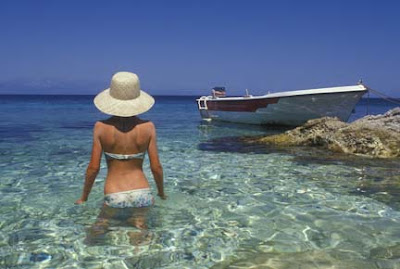
A polarising filter is a great tool when photographing in the strong summer sunlight. Here it has darkened an already deep blue sky and helped to take the reflective white sheen off the surface of the sea, exposing even more colour beneath the surface.
If the sun goes in – take the polarising filter off and maybe replace it with a Neutral Density (ND) Gradual grey filter to darken a cloudy sky, add atmosphere and draw the viewer’s eye down to the main subject.
Bottom photograph
The gift shops along the prom or on the pier are sure to attract lots of people looking for postcards to send home. All you need do is lie in wait for a likely subject and go to work. Chances are they will be so absorbed in what they are doing they won’t even notice you